
The claim didn’t even make it to the payer.
No denial.
No adjustment.
No appeal.
Just an invisible tripwire that kicked it back before it ever had a chance.
And the kicker? It wasn’t even a big mistake—just a missing ZIP code, a misformatted ID, or a patient’s name that didn’t match what the insurance company had on file.
Welcome to the world of front-end rejections.
Fast. Brutal. Completely preventable.
Every time a claim gets rejected at the front end, your revenue cycle hits a wall, and your team is left picking up the pieces. Manually correcting data. Re-submitting claims. Hoping they stick the second (or third) time.
Here’s the truth: front-end rejections aren’t a payer problem.
They’re a workflow problem.
And the good news? That means they can be fixed before they ever happen.
Let’s talk about how.
Why Front-End Rejections Matter
Let’s be clear: front-end rejections don’t just stall a claim. They stall your entire billing engine.
Every time a claim gets rejected at the front end, here’s what happens:
You don’t get paid.
Not delayed. Not partially reimbursed. You’re starting from zero.
And that rejected claim? It won’t even age in your system, because it was never accepted. It’s invisible revenue just… floating.
Your team burns time fixing preventable issues.
They open the EHR, cross-check clearinghouse reports, retype patient demographics, reformat insurance IDs… again.
And again.
And again.
Multiply that by dozens of claims per week, and you’re losing days of staff time every month to mistakes that should’ve been caught—or never made at all.
Delays lead to denials.
Claims that sit too long often miss payer filing deadlines.
And once that window closes? It doesn’t matter how perfect the claim is—you don’t get paid.
Morale nosedives.
Your team didn’t sign up to play “Where’s the formatting error?” on a loop.
This kind of repetitive rework leads to stress, burnout, and (eventually) turnover.
The cost of front-end rejections isn't just financial.
It’s operational. Emotional. Cultural.
And in almost every case? Preventable.
According to MGMA, practices lose an average of $25 to $100 per rejected claim, even before it’s resubmitted. Factor in team time and resubmission cycles, and that number jumps fast.
But here’s the upside: you can stop the bleeding—without hiring more staff or overhauling your systems.
You just need better prevention, baked into your workflow.
Top 5 Reasons for Front-End Rejections
Here’s the truth no one wants to admit: Most front-end rejections happen because of simple, preventable mistakes.
And not “someone messed up” mistakes. These are system-level slipups that happen when admin teams are forced to juggle disconnected software, inconsistent data sources, and too many claims at once.
Let’s break down the most common offenders:
Reason #1: Patient Demographic Errors
Missing date of birth
Misspelled name
Incorrect or outdated insurance member ID
Mismatched gender or address
Even a single character off can trigger a full rejection.
Reason #2: Coverage Eligibility Gaps
The patient wasn’t covered on the date of service
Plan was inactive or terminated
Insurance verification wasn’t completed or synced properly
This one stings because it often doesn’t get caught until after the visit, and by then, the clock is already ticking on filing limits.
Reason #3: Invalid or Incomplete Coding
Outdated CPT or ICD-10 codes
Missing modifiers
Diagnosis doesn’t support the procedure billed
Coding mismatches can flag a claim before it even clears your EHR.
Reason #4: Payer-Specific Format Issues
Payer ID entered incorrectly
Required fields left blank or misformatted (e.g., ZIP+4, NPI, taxonomy codes)
Non-standard field characters (like symbols or extra spaces)
Some payers have different field requirements, and your software won’t always catch it before the claim is kicked back.
Reason #5: Duplicate Submissions
The same claim was submitted twice
Or resubmitted with a small change, without proper correction process
Clearinghouses flag duplicates fast, and they won’t process them until the issue is resolved manually.
Common Front-End Rejection Codes
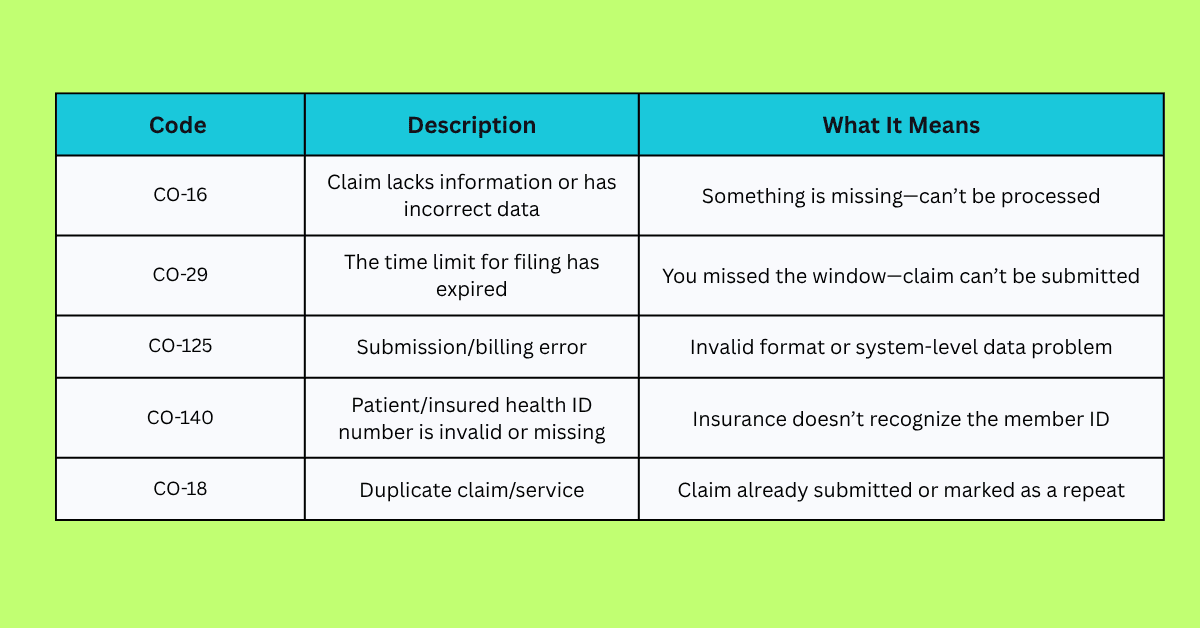
These aren’t “random errors.” They’re predictable patterns—and once you identify them, you can build workflows to stop them before they ever hit the clearinghouse.
Let’s talk about how.
How to Prevent Front-End Rejections: 4 Steps
You don’t need to guess your way to cleaner claims.
You just need the right systems, the right checks, and a little automation in your corner.
Here’s how high-performing admin teams are preventing front-end rejections before they happen:
Step 1: Get Patient Data Right at Intake
Start clean, stay clean.
Use digital intake forms with required fields and field validation
Cross-check insurance ID against real-time eligibility tools (270/271 transactions)
Sync patient data across EHR, PMS, and clearinghouse
Flag mismatches before the claim is created
If the data is wrong going in, your claim doesn’t stand a chance going out.
Step 2: Standardize Data Entry Across Systems
One patient, one record. Everywhere.
Set formatting rules for key fields (DOBs, ZIPs, phone numbers, plan IDs)
Train staff on payer-specific quirks and requirements
Create templates for common visit types and coding combinations
Use dropdowns and logic-driven fields wherever possible to reduce variability
Standardization = fewer surprises.
Step 3: Run Pre-Claim Validation Checks
Don’t wait for the clearinghouse to catch the error.
Use claim scrubbers and edit tools inside your PMS or clearinghouse
Set rules to automatically flag missing data or invalid codes
Build payer-specific validation profiles for your most common carriers
Identify high-risk claims before they leave the building
Prevention beats resubmission. Every time.
Step 4: Automate the Claim Review Process
Manual review is inconsistent and time-consuming. Automation isn’t.
Tools like Magical:
Autofill fields using accurate data from trusted sources (like your EHR)
Catch missing or misformatted entries before submission
Eliminate toggling between tabs, systems, and portals
Reduce rework and free up your billing team to focus on escalations, not typos
One click now beats 10 clicks later.
How Magical Helps Prevent Front-End Rejections
Magical doesn’t sit on the sidelines and tell you where things went wrong.
It jumps into the workflow, fixes the problem in real time, and moves the claim forward—clean, complete, and ready for reimbursement.
Here’s how it works:
Autofills Missing Patient and Payer Data
Instead of toggling between EHR, billing software, and clearinghouse portals to track down a date of birth or insurance ID, Magical:
Pulls verified data from prior records
Inserts it directly into claim fields
Ensures formatting is payer-ready from the start
Result: No more missing fields. No more preventable holds.
Applies Smart Formatting and Field Rules Automatically
Payer wants ZIP+4? Done.
Phone number needs to be stripped of dashes? Easy.
Magical applies field formatting rules behind the scenes, so your team doesn’t have to second-guess what each carrier wants.
Result: Fewer rejections caused by invisible formatting errors.
Prevents Duplicates and Redundant Entries
Magical keeps your data clean and consistent, reducing copy-paste errors and duplicate claim submissions. It works across tabs and platforms, ensuring one version of the truth across all systems.
Result: Cleaner claims, fewer clearinghouse flags.
Works Where Your Team Works
No switching systems. No integration nightmares.
Magical runs directly in your browser, sitting on top of:
EHRs
PMS systems
Clearinghouses
Intake platforms
Anywhere your team types, clicks, or enters data, Magical is there.
HIPAA-Compliant, Built for Healthcare Admins
This isn’t a general-purpose automation tool trying to squeeze into healthcare.
Magical was built for the front lines of medical billing with privacy, compliance, and real-world workflows baked in.
You don’t need another software platform.
You need a tool that makes your current system smarter, faster, and rejection-proof.
That’s what Magical delivers.
Building a Front-End Rejection Prevention Workflow
Prevention isn’t a single tool or a new hire.
It’s a repeatable workflow—one that catches issues early, fixes them instantly, and moves claims out the door clean the first time.
Here’s what that looks like in practice:
Front-End Rejection Prevention Flowchart
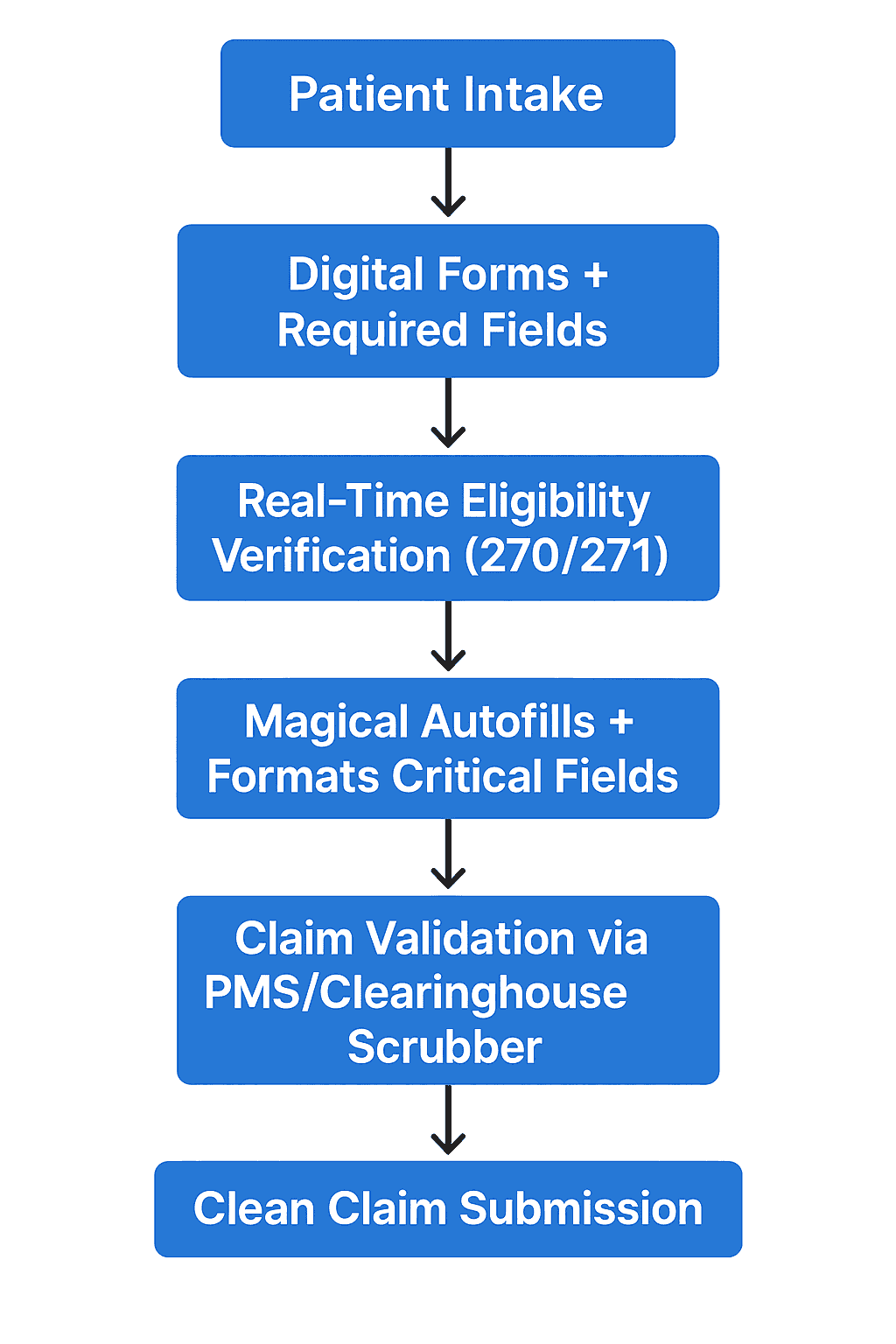
Let’s break it down:
Patient Intake with Data Validation
Use digital forms that require complete info before the patient ever hits your schedule. Add logic-based fields that reduce human error at the source.
Real-Time Eligibility Checks
Verify coverage in advance—before services are rendered. Reduce "inactive policy" rejections before they become billing nightmares.
Automated Data Entry and Formatting with Magical
Magical fills in the gaps:
DOBs
Insurance IDs
ZIP codes
Phone numbers
Payer-specific formatting. All done in the background while your team works in their usual tools.
Claim Pre-Validation
Your PMS or clearinghouse scrubbing engine catches any remaining issues—ideally, not many by this point.
Clean Submission → Payment Without the Ping-Pong
No more back-and-forth. No more resubmissions. Just clean claims and faster revenue.
That’s what a modern, rejection-proof billing workflow looks like.
It’s efficient. Repeatable. And completely possible—with the right tools.
Additional Tools That Support Rejection Prevention
Magical is the automation layer that catches and corrects issues before claims are submitted—but it works even better when paired with foundational tech that supports clean data, payer visibility, and real-time validation.
Here are the key players to round out your rejection-proof stack:
Eligibility Verification Tools (270/271 Transactions)
Instantly verify patient insurance eligibility
Reduce coverage-related rejections
Access benefits data directly from payers
Supports automated or batch verification before the visit
Pair with Magical: After verifying, Magical can auto-fill verified coverage details directly into the PMS or claim form.
Claim Scrubbers and Validation Engines
Examples: Waystar Claims Manager, PracticeSuite,Tebra
Run pre-submission checks for CPT/ICD mismatches, modifiers, missing fields
Apply payer-specific rules for cleaner submissions
Flag issues before the claim ever leaves your system
Pair with Magical: Let Magical fix formatting or missing fields flagged by your scrubber before your team wastes time correcting them manually.
EHR and PMS with Strong Data Sync
Examples: Athenahealth, AdvancedMD, eClinicalWorks
Ensure patient data flows accurately from intake → clinical → billing
Reduce double entry
Prevent front-end rejections caused by out-of-sync or stale records
Pair with Magical: Magical overlays any EHR or PMS, filling in gaps that the system misses—and doing it across systems without integrations.
Clearinghouses with Rejection Reporting
Examples: Change Healthcare, Office Ally, Availity
Provide real-time feedback when claims are held or rejected
Categorize rejections by type, payer, and frequency
Offer reporting to improve future submission quality
Pair with Magical: Use those insights to identify common rejections, then set Magical to proactively fix those issues before the claim hits the clearinghouse again.
Together, these tools create a smart, automated defense against front-end rejections.
And with Magical in the middle? You can finally connect the dots without hiring more staff or buying another bloated platform.
Final Thoughts: Fix the Front-End, Fix the Flow
Front-end rejections aren’t just technical glitches.
They’re system failures—and they’re stealing time, money, and morale from your billing team every single day.
But here’s the good news: these problems don’t require a full system overhaul.
They just require smarter workflows, cleaner data, and automation that doesn’t wait until something goes wrong to get involved.
That’s what Magical delivers.
Autofill the right data. Format it correctly. Catch errors before they cost you. It’s not about doing more work.
It’s about removing the work that shouldn’t be there in the first place.
Try the free Magical Chrome extension today to start eliminating repetitive billing tasks, or book a demo to see how your team can automate front-end rejection prevention from day one—no code, no waiting.
Your claims deserve a clean start.
Your team deserves better workflows.
Let’s make both happen.