You coded the visit correctly.
You submitted the claim on time.
You even attached documentation.
Still denied….because the modifier was wrong. Or missing.
Or used too often.
Or not used at all.
Sound familiar?
Modifiers don’t just tweak billing codes. They tell the story behind the service, and whether or not it gets paid.
They explain:
Why a second procedure was medically necessary
Why a lab test was repeated
Why a bundled service should be unbundled
Why this visit should be reimbursed separately from the last one
When they’re used correctly, modifiers protect revenue.
When they’re used incorrectly — or not at all — they trigger denials, payment delays, and audit exposure.
Even experienced coders and billing pros get them wrong, not because they’re careless, but because payer rules are inconsistent, evolving, and often buried in LCDs, NCCI edits, or payer-specific policies.
This blog is your straight-up, no-jargon breakdown of what modifiers do in RCM and how to stop them from wrecking your clean claim rate.
What Are Modifiers in RCM (And What Do They Do)?
Modifiers are two-character codes (numeric or alphanumeric) that get tacked onto CPT or HCPCS codes on a medical claim.
They’re small, but powerful.
Because a modifier doesn’t just describe a procedure. It adds context.
It tells the payer, “Here’s why this service was done this way, and here’s why it still qualifies for reimbursement.”
When submitted correctly, modifiers:
Unlock payment for services that would otherwise be denied
Prevent bundling or duplicate logic from blocking the claim
Support compliance with payer-specific documentation rules
When used incorrectly or omitted, modifiers:
Trigger claim edits (like MUEs or NCCI bundling flags)
Cause denials for services that were legitimately performed
Invite audit scrutiny from MACs, RACs, or commercial payers
According to a 2024 OIG audit brief, modifier misuse accounted for over $2 billion in improper Medicare payments, largely tied to Modifiers 25, 59, and 91.
Why Modifiers Exist in the First Place
Without modifiers, the claim doesn’t tell the full story.
Say a patient receives two procedures on the same day. Medicare’s bundling logic might reject both because it thinks they’re duplicates, unless you append a modifier (like 59) to explain the medical necessity of performing both separately.
Or a physician performs an E/M visit and a minor procedure at the same encounter. That E/M might be denied unless Modifier 25 is added to show it was separately identifiable.
Modifiers are what make gray areas billable when the coding supports it.
Types of Modifiers You’ll See in RCM
There are over 150 possible CPT and HCPCS modifiers, but in real-world billing, only a handful account for most of the action.
Here are the ones your team works with every day:
Modifier | Meaning | Common Use Case |
25 | Significant, separately identifiable E/M service | Used when an E/M and procedure occur on same day |
59 | Distinct procedural service | Used to bypass NCCI edits and unbundle related procedures |
91 | Repeat clinical diagnostic lab test | Used for medically necessary repeat lab on same day |
76 | Repeat procedure by same provider | Same CPT repeated due to clinical need |
77 | Repeat procedure by different provider | Same CPT repeated by another clinician |
LT/RT | Left/right side of body | Used for bilateral procedures |
TC/26 | Technical vs professional component | Used to split radiology or diagnostic services |
GA | Waiver of liability on file | Used with ABNs for non-covered services |
GY | Item/service statutorily excluded | Not medically necessary under Medicare rules |
AAPC modifier audits show that 25 and 59 are the most overused and most incorrectly applied modifiers, especially in high-volume specialties like urgent care, orthopedics, and cardiology.
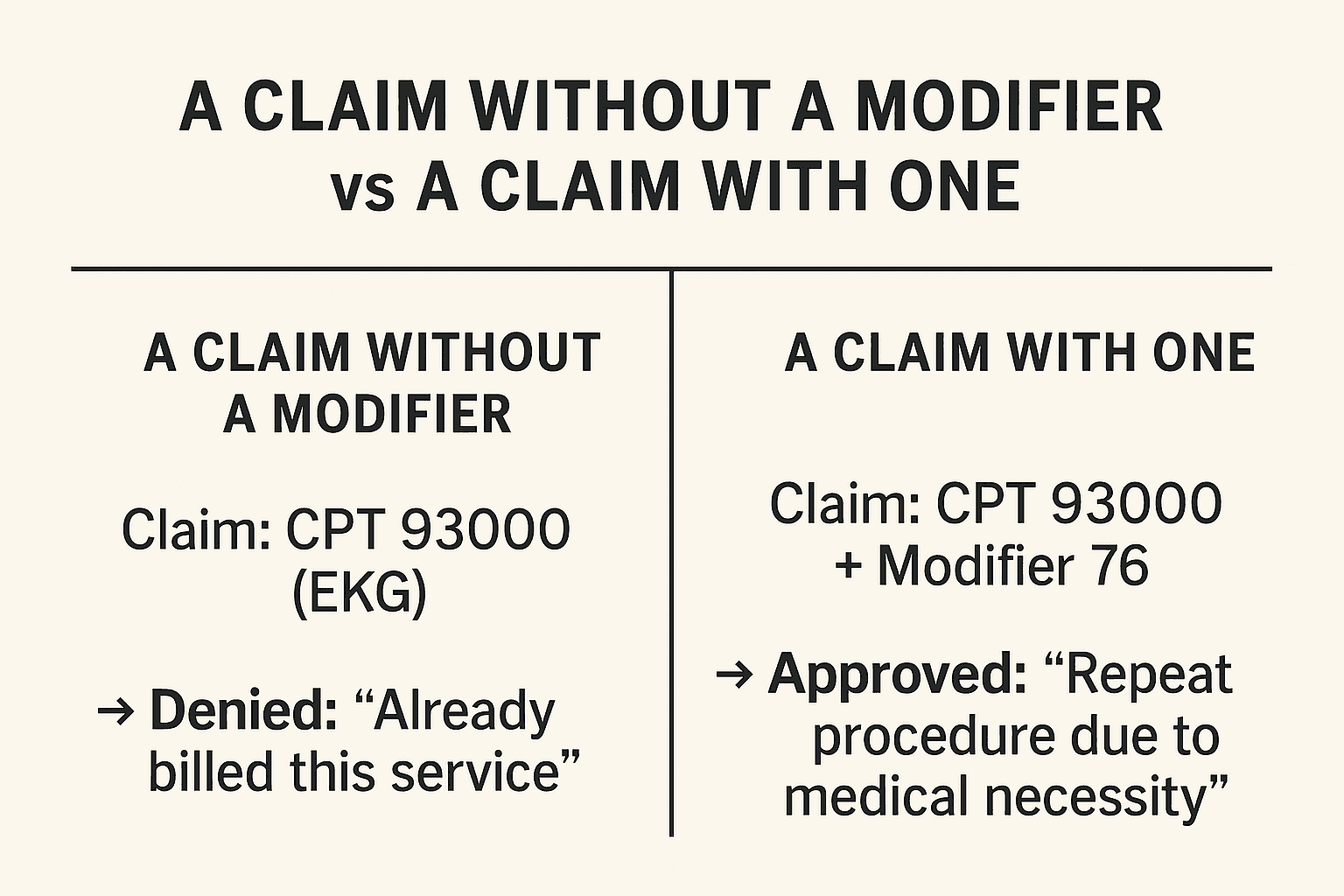
Modifiers add clinical and billing context payers require.
Modifiers Aren’t Optional. They’re Strategic
They’re not just compliance checkboxes. They’re essential tools for:
Explaining clinical decisions
Bypassing bundling edits
Getting paid for what was actually done
But because modifiers depend on nuance, documentation, and payer-specific rules, manual application is where things often go sideways.
And that’s what we’re tackling next.
Where Modifier Mistakes Happen & What They Cost You
Modifier mistakes don’t usually trigger alarms. They’re quiet. Routine.
They slip through workflows until the claim is denied, the payment is delayed, or an audit comes knocking.
The truth is that most modifier errors aren’t caused by carelessness. They’re caused by:
Conflicting payer rules
Changing LCD and NCCI guidelines
Unclear documentation
Rushed submission workflows
Lack of automation to validate usage
Let’s break down the most common modifier misfires and what they’re really costing RCM teams.
Modifier 25: The “Most Denied” Modifier in RCM
Modifier 25 is supposed to indicate that a separately identifiable E/M service was provided on the same day as a procedure.
But it gets denied when:
The documentation doesn’t clearly support the distinct E/M
The payer policy doesn’t honor it for that procedure
It’s used too frequently, triggering review
In a 2024 CMS CERT audit, Modifier 25 had one of the highest improper payment rates, largely due to insufficient documentation.
The result:
Denials with CO-97 (non-covered charge)
Increased scrutiny from MACs and commercial plans
Risk of audit if used habitually
Modifier 59: The Unbundling Modifier (and Audit Trigger)
Modifier 59 tells payers: “Yes, these services look bundled, but they’re not.”
It’s often used to:
Bill two procedures on the same day that normally trigger NCCI edits
Justify medical necessity for unbundled services
The risk? Overuse or misuse is a red flag for auditors.
The OIG previously reported that 40 percent of Modifier 59 claims were paid in error, resulting in millions in overpayments.
Misuse can result in:
Recoupments
Medicare prepayment reviews
Even fraud investigations in extreme cases
Modifier 91: Repeat Labs Gone Wrong
Modifier 91 is used for medically necessary repeat lab tests, but not for reruns due to specimen issues, quality control, or billing errors.
When applied incorrectly:
Payers deny for CO-96 (non-covered charge)
Entire lab panels may be flagged
Reimbursements are delayed across the batch
The Documentation Disconnect
Even when the modifier is technically correct, if the documentation doesn’t support it, it’s still a denial or worse, a compliance risk.
Common issues:
No note for the E/M visit supporting Modifier 25
No procedure note separation for Modifier 59
No ABN signed for services billed with GA/GY
A recent survey reported a 22% increase in claim denials tied to unsupported modifier usage, even when the modifiers were applied correctly from a billing perspective.
Inconsistent Payer Rules
What Medicare allows, Cigna might deny.
What one MAC supports, another might reject.
And even with a valid modifier, payers may:
Require additional documentation
Apply frequency limits
Flag for medical necessity reviews
Without real-time policy awareness, even “safe” modifier use can trigger a denial.
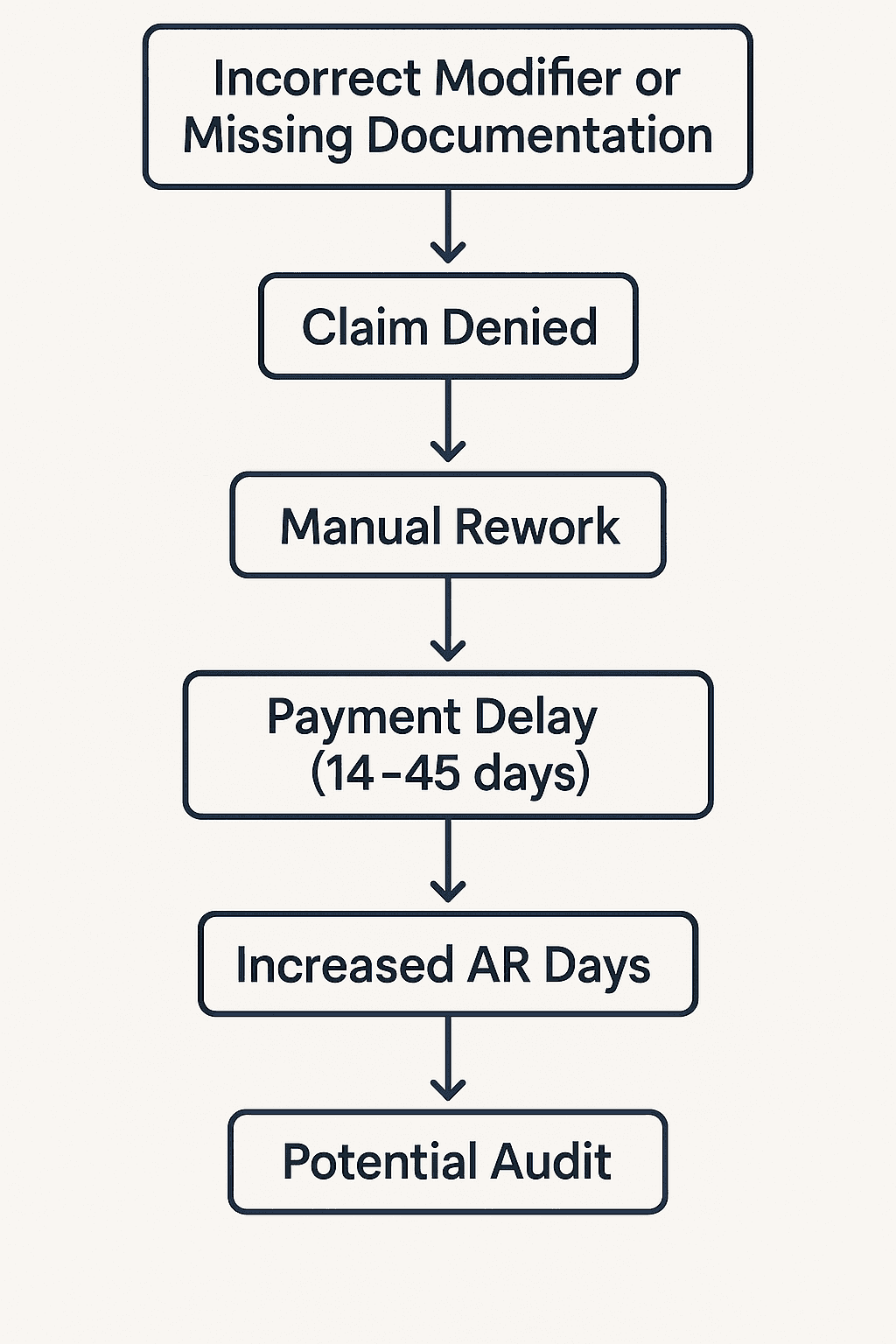
Modifier misuse rarely ends with a simple denial.
The Cost Isn’t Just a Denied Claim. It’s a Broken Workflow
Each modifier error adds:
More work for already overloaded billing teams
Frustration for providers who thought they did it right
Delays in reimbursement across the board
More pressure on AR follow-up
Exposure to audits that can go back years
It’s not sustainable.
And it’s why top RCM teams are moving away from manual modifier logic — and bringing in automation to apply, validate, and document modifiers the right way, every time.
How to Automate Modifier Logic Without Risking Accuracy or Compliance (4 Steps)
The idea of automating modifiers might sound risky.
After all, these are high-stakes billing decisions. You don’t want a bot applying Modifier 25 to every E/M visit and triggering a Medicare audit.
The risk isn’t automation. The risk is doing this manually.
Because at scale, human workflows break down:
Staff miss flags in scrubber reports
Modifiers are added out of habit, not policy
Documentation is inconsistent
Rules change, and updates fall through the cracks
That’s why leading RCM teams are automating modifier decisions intelligently with AI agents that operate based on policy, context, and documentation.
Here’s how it works.
Step 1: Scrubber or Rules Engine Flags a Modifier Opportunity
This is the “heads up” phase. Your claim scrubber or billing logic engine identifies something like:
E/M + procedure on the same day
Repeat lab on the same day
Two bundled CPTs triggering an NCCI edit
But your scrubber can’t make the final call. It can only flag.
Step 2: Magical Agent Analyzes the Claim + Documentation
This is where real automation steps in. The Magical agent:
Pulls the LCD/NCCI policy tied to the CPT
Checks for prior services that trigger frequency edits
Scans the provider note for language that supports the modifier
Cross-references payer-specific rules
Validates whether the modifier is truly appropriate
No assumptions. No blind logic.
If the documentation or payer rules don’t support it, the modifier is not applied.
If they do, the agent moves forward with confidence.
Step 3: Modifier Is Applied and Tracked With Full Visibility
Once validated, the Magical agent:
Adds the correct modifier to the claim
Documents the policy reference or documentation excerpt
Submits to clearinghouse or MAC portal
Logs everything for audit readiness
This means your team has a traceable, compliant record of every modifier applied:
What it was
Why it was used
What policy or document supported it
Who (or what) applied it
When it was submitted
Step 4: Post-Submission Monitoring for Modifier-Related Denials
Even with perfect logic, payers can still deny claims. That’s why automation continues after submission.
Magical agents:
Watch for common modifier-related denial codes (e.g., CO-97, CO-109)
Identify if a previously applied modifier is being flagged
Route the denial to the right person or rework queue
Suggest documentation additions or ABN usage if needed
According to Waystar, teams using modifier-aware automation tools saw a 37% decrease in preventable modifier-related denials in 2024.
This Isn’t RPA. It’s Context-Aware, Policy-Safe Automation
Magical isn’t guessing. It’s:
Pulling the right LCD
Reading the provider note
Understanding which MAC applies
Applying only what the payer rules support
That’s the difference between reckless automation and scalable, compliant RCM workflow transformation.
Final Thoughts: Modifiers Are Small. Until They Cost You Everything
They’re two characters. Just a pair of numbers.
Easy to miss.
Easy to misuse.
Easy to forget.
But when modifiers are wrong (or missing), the results are anything but small:
Denials stack up
Clean claim rates drop
Appeals clog the AR queue
MAC audits get triggered
Providers get frustrated
Revenue slips through the cracks
And it’s not just about getting paid. It’s about trust.
Trust in your billing data.
Trust in your documentation.
Trust that your team’s work will translate into revenue, not rework.
Manual Modifier Management Doesn’t Scale
Even the best coders can’t keep pace with:
Constantly changing LCD/NCCI rules
Payer-by-payer modifier differences
Back-to-back E/M visits with questionable supporting notes
Repetitive lab claims that all need careful review
That’s not a personnel problem.
That’s a workflow design flaw.
And that’s exactly what automation is built to solve.
Try Magical & Let Your Agents Handle Modifier Logic With Accuracy and Speed
Magical is used by almost 1 million professionals and at more than 100,000 companies — helping teams stop reacting to scrubber alerts and start executing the modifier workflows that get claims paid fast, cleanly, and compliantly.
With Magical, your AI agents can:
Apply Modifiers 25, 59, 91, and more — only when policies and documentation support them
Navigate LCD/NCCI rules by MAC, CPT, and payer
Submit claims and attach audit-ready notes
Flag and route modifier-related denials automatically
Install the free Magical Chrome extension or book a demo for your team today!
Because your team has better things to do than resubmitting a claim that needed two digits and got denied anyway.