
Most billing errors don’t start in the billing department.
They start in the gap between what happened and what got recorded.
A clinician provides care. A note is written. A charge is entered.
At some point in that chain, something goes missing or doubles up.
And unless someone catches it before the claim goes out, your revenue takes the hit.
That’s what charge reconciliation is built to prevent.
And if your workflow is manual, disconnected, or inconsistent, it’s also what’s slipping through the cracks.
The truth? Charge reconciliation isn’t a billing task.
It’s a financial safeguard. A final checkpoint between patient care and payment.
If you’re not doing it right, you’re not just leaving money on the table. You’re inviting denials, audits, and revenue leakage you’ll never see coming.
Let’s unpack what charge reconciliation really is, where it fits in your process, and how smart automation makes it nearly effortless.
What Is Charge Reconciliation in Healthcare?
Charge reconciliation is the process of matching the services a patient received with the charges that were actually billed.
Sounds simple. But in most healthcare orgs, it’s anything but.
Multiple providers, different systems, last-minute documentation updates, coding variations, and insurance nuances all collide in the space between care delivery and claim submission. And if just one line item doesn’t match up?
That charge can get denied, duplicated, or quietly disappear.
The Real Purpose of Charge Reconciliation
It’s not just about double-checking the bill. It’s about:
Catching missed services before they go unbilled
Preventing duplicate charges that flag claims as fraudulent
Ensuring documentation backs every code
Protecting your revenue from silent loss
Done right, charge reconciliation serves as a financial quality control step before a claim ever leaves your billing system.
Why It Matters
According to the Healthcare Financial Management Association (HFMA), poor charge reconciliation is responsible for 1–5% of annual net revenue loss in most healthcare organizations.
That means a $10M clinic could be losing $100,000 to $500,000 every year, without ever seeing a formal denial.
And it’s not just about revenue. Failed reconciliation can also lead to:
Delayed claims and longer A/R cycles
Increased risk of payer audits
Damaged compliance standing if documentation doesn’t align with charges
Where Charge Reconciliation Happens in the Workflow
It usually takes place:
After documentation is completed
Before the claim is submitted
The billing or RCM team reviews:
What services were provided (via the EHR or chart notes)
What charges were entered into the billing system
Whether every billable service has a matching code
If all codes are properly supported by documentation
If something’s missing, duplicated, or unsupported, it gets flagged and fixed.
Or at least, that’s how it’s supposed to work.
The Key Steps of the Charge Reconciliation Process
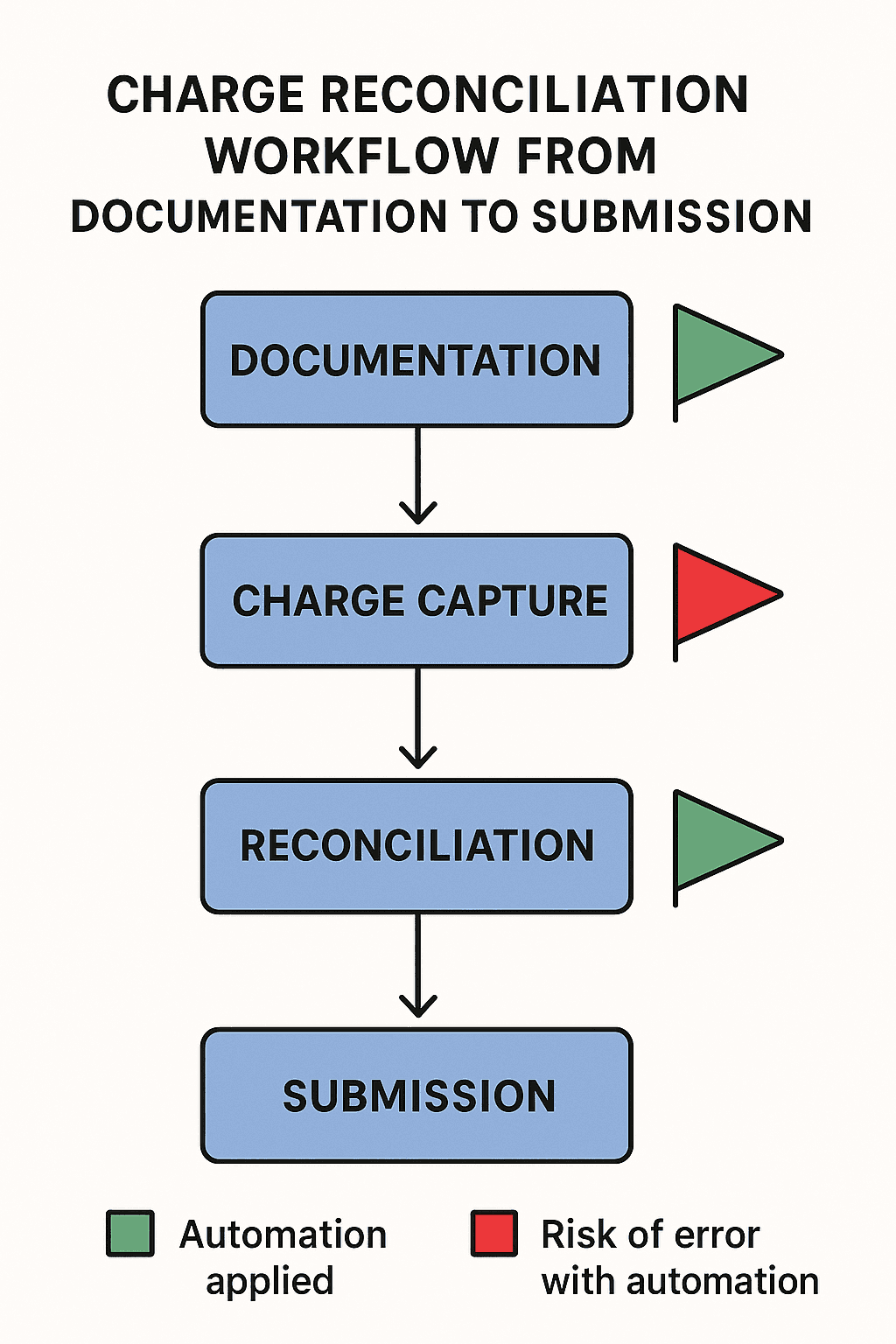
Charge reconciliation isn’t a single task. It’s a workflow made up of checkpoints. Each one designed to make sure what happened in the exam room actually makes it onto the bill.
Here’s what that process looks like when it’s done right (and where it breaks down when it’s not):
Step 1: Capture All Clinical Activities
Everything starts with documentation.
Providers enter chart notes, procedure details, and visit types into the EHR. But if services aren’t fully documented or details are vague, billing either misses the charge completely or codes it incorrectly.
This is where underbilling starts.
Common failure points:
Chart notes entered late
Incomplete or rushed documentation
Ancillary services not documented (injections, labs, follow-ups)
Step 2: Translate Services into Billable Charges
Clinical activity is now translated into CPT, HCPCS, and ICD codes, either manually by the provider or by the billing team.
Each code must:
Match the service documented
Be appropriate for the patient’s condition and insurance plan
Include required modifiers (when applicable)
Miss a code or apply the wrong one? You’ll either lose the charge or trigger a denial.
Step 3: Match Charges to Documentation
This is the core of reconciliation.
Billing teams cross-check what’s in the EHR (what was done) against what’s in the billing system (what’s being billed).
They look for:
Charges that don’t match chart notes
Services documented but not billed
Duplicate charges
Unsupported codes with no clinical justification
Manual matching is tedious and easy to get wrong.
Step 4: Resolve Mismatches or Omissions
When errors are found, staff must:
Reach out to providers for clarification
Adjust codes or add documentation
Manually update the billing system
This is where reconciliation becomes a time sink, especially when done days after the visit.
Without automation, it’s hard to close the loop in time to avoid delays or write-offs.
Step 5: Final Review Before Submission
Once everything is aligned, charges are pushed to the clearinghouse or payer portal. But if something was missed in earlier steps, the error now becomes a formal claim issue, and much harder (and more expensive) to fix.
Step 6: Log, Audit, and Track
Advanced orgs keep a record of every reconciliation review:
What was corrected
Who made the change
When it was finalized
This audit trail supports compliance and helps spot recurring patterns of error.
Common Challenges in Manual Charge Reconciliation
Charge reconciliation is critical. But when the process is manual, disconnected, or paper-based, it becomes a breeding ground for errors, frustration, and silent revenue loss.
Here are the most common pain points healthcare teams face when doing it the old-fashioned way:
Disconnected Systems = Disconnected Data
When documentation lives in one system, and billing happens in another, someone has to bridge the gap, usually by hand.
That means:
Manually toggling between EHR and billing platforms
Copy-pasting codes and notes
Constant rechecking to ensure nothing was missed
Each touchpoint is a chance for a charge to be dropped, duplicated, or miscoded.
Documentation Delays Slow Everything Down
If a provider finishes their notes two or three days after the visit, reconciliation stalls. By the time billing gets the full picture, it’s harder to:
Chase down clarifications
Add missed codes
Meet timely filing deadlines
According to the Medical Group Management Association (MGMA), incomplete documentation is one of the top five causes of delayed claims and denials.
Human Error Is Inevitable
When you’re matching charges to services line by line, across platforms, under time pressure, mistakes happen:
Missed charges
Wrong codes
Services billed twice
Missing modifiers
Incomplete justifications
Even your best team members can’t catch it all, every time.
Manual reconciliation isn’t just inefficient. It’s unsustainable.
No Alerts When Something Goes Missing
In a manual system, there’s no way to know when a charge is:
Skipped
Misaligned
Or completely forgotten
And once a service is missed, there’s often no automatic prompt to recover it. Unless someone catches it during an audit or downstream denial.
Time Drain on High-Value Staff
Your billing team should be strategizing, not chasing down modifiers or squinting at chart notes.
When skilled RCM professionals spend hours on rework and verification, you're:
Wasting payroll
Increasing burnout
Delaying clean claims
Lack of Standardization Across Teams or Locations
If every provider or location handles documentation and charge entry differently, reconciliation becomes chaotic.
There’s no way to scale quality when everyone is doing things “their way.”
These challenges don’t just create errors. They create a system where errors are guaranteed.
How Automation Transforms the Charge Reconciliation Process
Manual reconciliation is about fixing.
Automated reconciliation is about preventing.
Instead of spending hours matching codes to chart notes or double-checking missed charges, automation makes sure your team enters clean, accurate, fully supported charges from the start.
And flags anything that doesn’t add up before the claim is submitted.
Here’s how that transformation happens in real time:
Real-Time Data Validation at the Point of Entry
With Magical, every time a provider or admin enters a charge, it’s automatically validated against:
The chart note
Common CPT/ICD combinations
Modifiers required for payer compliance
Services typically associated with the visit type
If something’s off, Magical prompts the user immediately:
“97110 typically requires Modifier 59 when billed with 97530. Add it now?”
No backtracking. No waiting for billing to find it three days later.
Autofill Across Disconnected Systems
Most reconciliation errors start when staff have to manually retype data across platforms. Magical eliminates that friction.
Patient data autofilled across EHR and billing platforms
CPT and ICD codes pulled from templates and synced in real time
Pre-auth and insurance fields filled with one click
Less toggling. Less typos. Less “Did we bill for that already?”
Smart Prompts to Catch Missed Charges
Magical can be configured to suggest charges based on:
Visit type
Provider specialty
Previous billing patterns
Example: A patient comes in for a joint injection. If the supply code or administration fee is missing, Magical prompts:
“Don’t forget to add J1885 and 96372—include now?”
That’s how revenue stays off the floor.
Templates That Standardize the Process Across Teams
Instead of everyone doing it their own way, Magical enables:
Shared billing templates
Consistent modifier use
Standardized workflows that reduce errors across every location
This isn’t just faster. It’s scalable, auditable, and repeatable.
Built-In Audit Trails and Transparency
Every autofill, prompt, and action is logged, so if you ever need to trace a charge, show compliance, or train new staff, the record is right there.
Automation doesn’t replace your team. It removes the errors that slow them down.
Charge Reconciliation in Action: Real-World Use Cases with Magical
Magical isn’t theoretical. Healthcare teams are already using it to catch missed charges, reduce billing errors, and eliminate rework before claims ever leave the building.
Here’s how it's working on the ground:
1. WebPT: Streamlining Therapy Charge Capture
The challenge: Physical therapy sessions often included multiple modalities. Each billable with different CPT codes and modifiers. But staff were overwhelmed juggling systems, and charges were frequently underbilled or missed entirely.
The Magical fix:
Smart templates autofilled CPT codes based on the service documented
Prompts ensured modifiers were added when billing codes like 97110 + 97530
Duplicate entries were flagged instantly
The result:
5–10 hours saved per team member per week
Cleaner, faster billing
Significant reduction in missed or failed charges
2. TCPA: Reclaiming Missed Revenue at Intake
The challenge: The intake process was slow and inconsistent. Patient insurance data often didn’t carry into billing cleanly, leading to coverage mismatches and missed pre-auth charges.
The Magical fix:
Patient and insurance fields were autofilled and validated at the point of intake
Charges for services tied to specific plans were automatically prompted
Staff no longer had to double-check fields across systems
The result:
Fewer failed charges due to insurance mismatch
Reduced rework for the billing team
Faster submission with cleaner claim packages
3. ZoomCare: Preventing Frontline Reconciliation Errors
The challenge: Frontline staff were retyping data into multiple systems, causing duplication errors, missed supply codes, and slow reconciliation downstream.
The Magical fix:
Charge fields were pre-populated using real-time data from prior entries
Missing supplies or procedures triggered on-screen prompts
Teams created reusable templates by visit type
The result:
80% reduction in repetitive admin work
Major drop in duplicate and omitted charges
Consistent reconciliation across locations
These orgs didn’t change their billing platforms.
They just added Magical on top, and their reconciliation issues started solving themselves.
How to Get Started with Automated Charge Reconciliation
You don’t need a full platform migration or six months of onboarding to fix charge reconciliation.
You just need to automate the moments where things slip through the cracks.
Here’s how teams are getting started with Magical in under an hour:
Step 1: Identify Your Top 3 Reconciliation Pain Points
Review recent claim denials or reconciliation logs. Look for patterns:
Are charges missing after certain visit types?
Are certain codes or modifiers frequently forgotten?
Do specific providers or departments have more manual corrections?
Start with what’s most frequent, not necessarily what’s most complex.
Step 2: Install the Free Magical Chrome Extension
Magical runs right in your browser and doesn’t require any IT setup or integrations.
It works with:
EHRs
Billing platforms
Payer portals
Internal tools
Excel and Google Sheets
If you can type into it, Magical can automate it.
Step 3: Build Autofill Templates for Frequent Charges
Start with your highest-volume workflows:
Common CPT/ICD combinations
Visit types with repeatable documentation
Charges that frequently need modifiers
Magical lets you:
Autofill entire fields with one keystroke
Insert modifiers based on logic
Ensure documentation and billing always match
Step 4: Add Smart Prompts to Catch Missed or Incomplete Entries
Set up trigger-based prompts to nudge your team when something’s off:
“Modifier 25 is missing for E&M + procedure combo.”
“Did you mean to include J1885 for this injection?”
“Diagnosis code is incomplete—update before submitting?”
These prompts eliminate guesswork and rework.
Step 5: Share Templates Across the Team and Track Results
Magical makes it easy to:
Distribute templates across staff
Standardize reconciliation workflows
Monitor which charges are getting flagged and fixed before submission
You’ll see the impact quickly:
Fewer missed charges
Fewer denials
Faster A/R and cleaner claims
Why Magical Is the Ideal Automation Tool for Charge Reconciliation
Most automation tools require IT buy-in, backend integrations, or months of setup.
Magical doesn’t.
It runs in your browser, works across your existing systems, and helps your team fix broken reconciliation workflows right now, without changing the way they work.
Here’s why it’s the right fit for healthcare admin teams:
It Works Where Your Work Happens
Magical is a Chrome-native tool that functions inside:
EHRs
Billing software
Payer portals
Google Sheets
Internal platforms
Intake and scheduling tools
Wherever your team enters data, Magical is already there, watching for gaps, filling fields, and preventing mistakes.
Zero-Code Setup and Instant ROI
No developers. No training delays. No new software to learn.
Install in seconds
Build templates in minutes
Deploy across teams instantly
Magical starts working the moment your team does.
Real-Time Prompts = Real Revenue Protection
Most reconciliation tools work after submission. Magical works before.
Its built-in prompts:
Flag missing codes
Suggest forgotten charges
Guide staff through modifier logic
Keep documentation and billing perfectly aligned
Your team doesn’t just move faster. They move smarter.
Scales With You, Without Complexity
Whether you’re a 10-person clinic or a multi-location group, Magical flexes to match:
Shared templates across departments
Consistent workflows from provider to biller
Transparent logs for audit-readiness and training
It’s lightweight, but powerful, and it grows with your operations.
When charge reconciliation becomes automated, accurate, and invisible, your team finally gets to stop fixing mistakes and start optimizing revenue.
Final Thoughts
Every missed charge is a missed opportunity. Not just for revenue, but for accuracy, trust, and momentum across your billing team.
Manual charge reconciliation slows everything down. It turns your smartest people into double-checkers. And it forces you to catch mistakes after they’ve already cost you money.
But it doesn’t have to be that way.
With automation, reconciliation becomes proactive, not reactive. Clean charges go out the first time. Documentation and billing finally align. And your team gets time back to focus on work that matters.
That’s what Magical is built for.
It’s fast. It’s intuitive. And it works inside the tools you’re already using without making your job harder.
Start automating today.
Try the free Magical Chrome extension
Or book a demo for your team and see how charge reconciliation errors disappear when automation works the way it should